
SLA (Service Level Agreement) in Qontak is used to determine the time limit for an Agent to handle a chat according to the defined target. SLA calculation starts when the chat is assigned to the Agent and continues until the SLA time limit is reached.
Operational hours do not stop or pause the SLA calculation. This setting only determines the applicable SLA policy based on when the chat started. Therefore, after the chat is assigned to the agent, the SLA completion deadline is determined based on the assignment time and the applicable SLA target.
To understand how SLA works in Qontak Chat, there are three main components to consider: SLA target, chat conditions, and operational hours. These three components determine the SLA time limit and which chats are included in an SLA policy.
A chat meets the Division condition if the chat comes in through a channel designated for that division.
In this guide, you will learn how Qontak determines the applicable SLA policy, how the SLA timer works, and how operational hours are configured and applied.
A. How Qontak Determines the SLA Policy
To determine the applicable SLA policy, Qontak goes through several stages based on when the chat started and the conditions defined for each policy. The selection flow is shown in the following image.
The SLA policy is determined once based on the chat start time and the conditions that are met. Operational hours are only used to filter out policies that do not apply, not to determine a more specific policy. If no applicable policy exists, the chat does not have an SLA status.
B. How the SLA Timer Works
Both targets are calculated from the time the chat is assigned, so the deadline is set when the Agent receives the chat:
Deadline = assignment time + SLA target
| Status | Conditions |
| In progress | There has been no response or resolution, and the deadline has not passed. |
| Passed | The chat was responded to or resolved before the deadline. |
| Breached | The chat was responded to or resolved at or after the deadline, or the deadline passed without a response. |
Resolution time is also calculated from the time the chat is assigned, not from the first response. (Target: 120 minutes, assigned at 10:00 → resolved at 11:45 = Passed, at 12:30 = Breached).
Transfers restart the timer for each agent. Each agent's SLA time is calculated from when the chat is received by that agent.
C. Operational Hours and Specific Conditions That Affect SLA
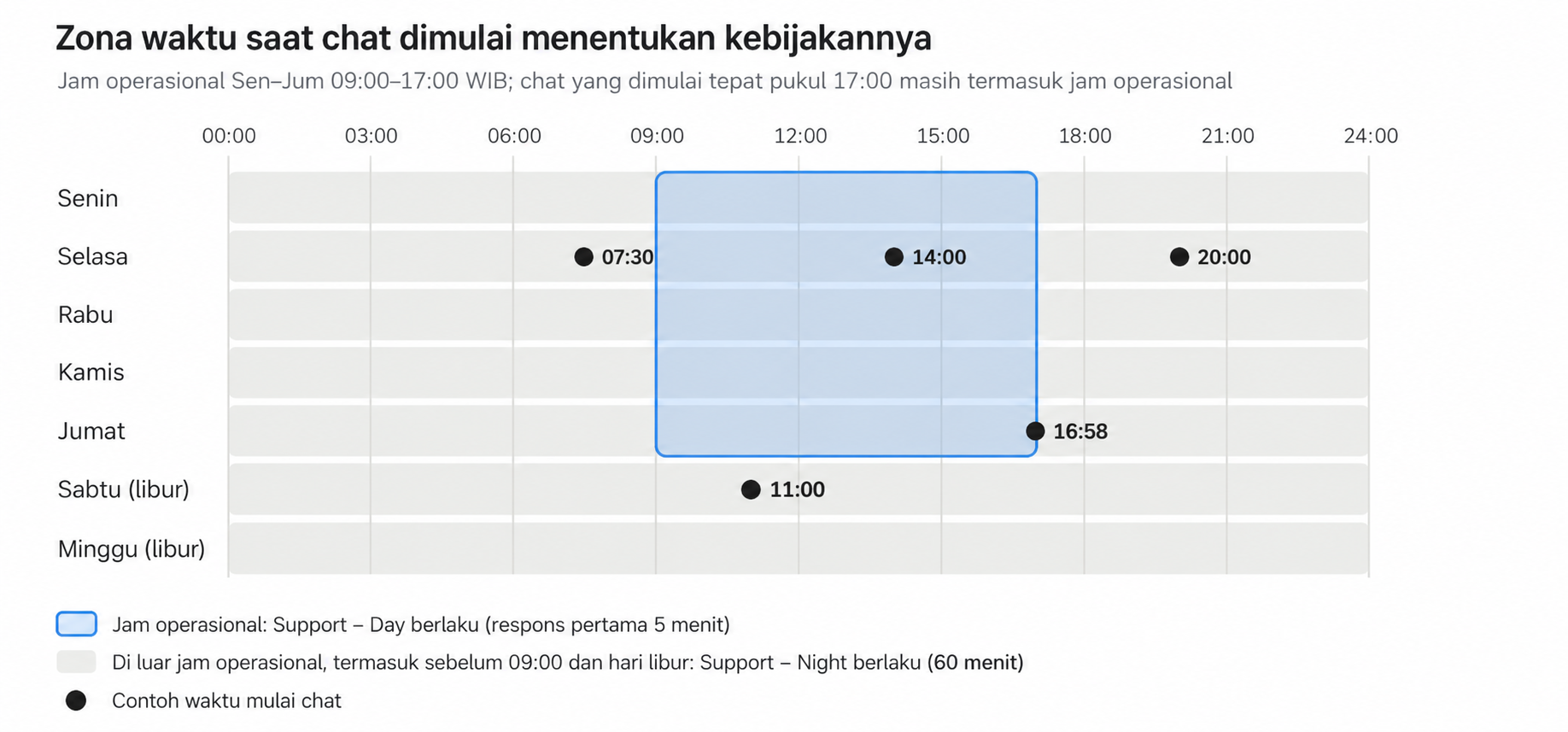
The SLA policy for operational hours is determined based on the chat start time. After the policy is determined, the SLA timer continues running past operational closing hours, including at night and on weekends.
| Situation | What Happens |
| The chat starts Friday at 4:58 PM, is assigned at 4:59 PM, and receives a response at 5:10 PM. | The SLA is declared a breach based on the Support – Day policy. The chat start time determines the 5-minute target, even though operational hours end at 5:00 PM. |
| The chat is assigned Tuesday at 8:05 PM under the Night policy (60-minute target), then receives a response Wednesday at 9:10 AM. | The SLA is declared a breach because the deadline is 9:05 PM. The timer continues running throughout the night. |
| There is only a Business hours policy, while the chat starts Tuesday at 8:00 PM. | There is no SLA status because no policy matches the chat time after operational hours. |
| The Any time policy (edited March 15) and the Business hours policy (edited March 1) have the same conditions. | The Any time policy is selected because it determines the result when the conditions are the same (tie-break), including when the chat starts during operational hours. |
| There are Sales (1 condition) and Sales – VIP (Division + VIP Tag conditions), while the chat has the VIP tag. | The Sales – VIP policy is selected because it has 2 matching conditions, outranking the policy with 1 condition. |
Configuration Recommendations
Make sure every chat has a matching policy: Create Business hours and After hours policies with the same conditions. Avoid pairing either of them with an Any time policy.
Adjust the SLA After hours target to match operational coverage: If no one responds until the morning, the 60-minute target will continue running and cause the SLA to be exceeded.
D. SLA Calculation Examples
All of the following examples use operational hours of Monday–Friday, 9:00 AM–5:00 PM WIB, with Saturday and Sunday as holidays.
- SLA during operational hours (Support – Day): first response time target of 5 minutes.
- SLA outside operational hours (Support – Night): first response time target of 60 minutes.
| No. | Setting | Time and Event | Result |
| 1 | 10-minute first response | The chat is assigned to Rina at 10:00 AM. The response deadline is 10:10 AM. |
• Responded to at 10:07 AM → SLA passed. • Responded to exactly at 10:10 AM → SLA breached because the response was provided exactly at the deadline. • Responded to at 10:12 AM → SLA breached. |
| 2 | 120-minute resolution | The chat is assigned at 10:00 AM. The resolution deadline is 12:00 PM. |
• Resolved at 11:45 AM → SLA passed. • Resolved at 12:30 PM → SLA breached. |
| 3 | 10-minute first response | The message comes in at 9:00 AM and is assigned to Budi at 9:20 AM. Budi responds at 9:28 AM. | SLA passed. Although the customer waited 28 minutes from when the message came in, the SLA calculation only counts the 8 minutes from when the chat was assigned to Budi. |
| 4 | Support – Night | The chat starts Tuesday at 8:00 PM, is assigned at 8:05 PM, and receives a response Wednesday at 9:10 AM. | SLA breached. The response deadline is 9:05 PM, and the timer continues running throughout the night. |
| 5 | Day + Night | The chat starts Friday at 4:58 PM, is assigned at 4:59 PM, and receives a response at 5:10 PM. | SLA exceeded based on the Day policy. The response deadline is 5:04 PM, even though operational hours end at 5:00 PM. |
| 6 | 10-minute first response | The chat is assigned to Rina at 10:00 AM and then transferred to Budi at 10:20 AM. Budi responds at 10:25 AM. | SLA met. The applicable deadline is 10:30 AM because the SLA calculation follows the time when the chat was assigned to Budi. |
E. Frequently Asked Questions
| Question | Answer |
| When does the SLA timer start? | When the chat is assigned to an agent. |
| Does the timer stop outside operational hours? | No. The timer continues running 24 hours a day. |
| What determines the policy based on operational hours? | The policy used is determined based on when the chat starts. |
| Are weekends or holidays counted as operational hours? | No. Weekends and holidays are considered outside operational hours. |
| Is a response provided exactly at the deadline still considered on time? | No. A response provided exactly at the deadline is declared Breached. |
| What happens if multiple policies match the chat conditions? | The policy with the highest number of matching conditions is selected. If the number of conditions is the same, the policy that was edited most recently is selected. |
| What happens if no policy matches? | The chat does not have an SLA status. |