
Currently, there is a feature called Customer Insights in Mekari Qontak CRM and Chat that makes it easier for you to obtain Customer-related information simultaneously because customer data repositories are often separated. This data consists of customer contacts, CRM, and Chat activities.
The Customer Insights feature functions to store customer activities from CRM and Chat, which are combined into a single Data Warehouse (DWH), and remove duplicate contact data. In the following steps, you will learn how to access the Customer Insights feature and each component contained within it. See the full explanation below.
A. Customer Growth Overview
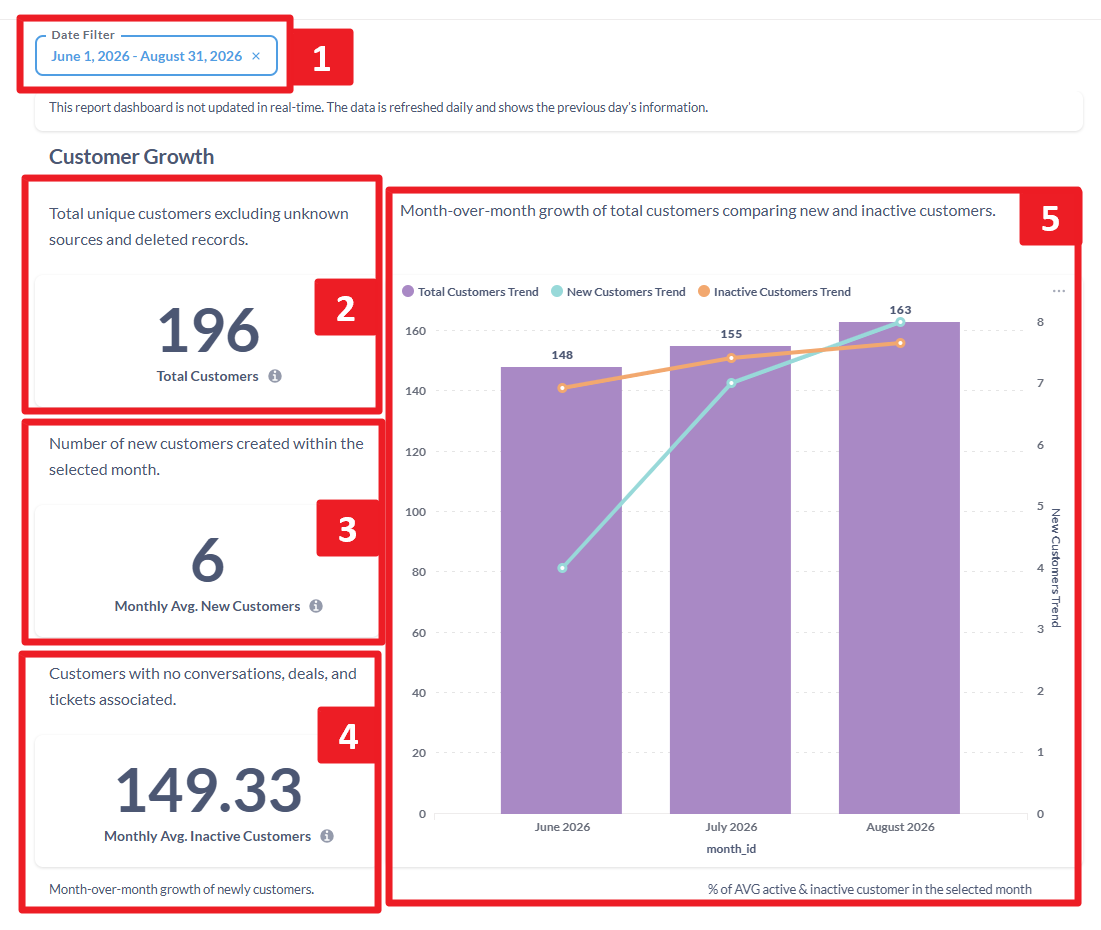
Description:
| No. | Feature Name | Explanation |
| 1 | Date filter | In the Date Filter menu, there are three time period options: Between, Before, On, and After. Specifically for Customer Insights, data is calculated monthly. Therefore, if you select On and the date October 17, 2026, the displayed data covers the entire month of October 2026, not only the data from October 17. |
| 2 | Total customers | Shows the total number of unique customers based on customer ID. The calculation only uses customer ID as the identity and does not include customer data that has been deleted from the Customer module. . Calculation: |
| 3 | Monthly Avg. New customers | Displays the number of new customers created in the selected month. Calculation: Number of unique customer records whose creation date falls within the selected period. |
| 4 | Monthly Avg. Inactive customers | The average number of customers per month who no longer interacted during the selected period. Calculation: Number of unique customer records that have not sent or received messages (no conversation room was created) and have no transactions created during the selected period. |
| 5 | Customer Growth Chart | Displays the month-to-month trend in customer growth, including total customers, new customers, and inactive customers. The chart also displays the average percentage of active and inactive customers in the selected month. Calculation: The figures are calculated based on the following categories: - Total customers: all existing customers. Example:
|
Customer Growth and Activity Trends
Description:
| Metric Name | Wording |
| Customer Growth Trend | Displays the month-to-month trend in customer growth, including total customers, inactive customers, and new customers. Chart description:
|
| AVG Active vs Dormant Customers | Displays the average percentage of active and inactive customers in the selected month. |
B. Customer Segmentations
Customer by Gender
A chart that displays the distribution of customers by gender.
Calculation:
Calculates customers based on the percentage distribution by gender. Undetermined genders will be categorized as "Other".
- Customer by company group
This chart displays the number of customers connected to company data in the Company module in CRM.
Calculation:
Counts contacts grouped by CRM. Contacts without an associated company (null) will automatically be labeled “Other”.
- Customer by source
This chart displays the customer origin from a specific channel (conversation).
Calculation:
Groups the number of customers by their originating source or channel, such as WhatsApp, Telegram, and Central. Customers with an empty source will be grouped into the Other category.
C. Customers by Location
Displays the 10 provinces or cities with the highest number of customers based on address data entered through the address picker in the Customer Data Platform. Empty address data will be grouped into the Other category.
D. Case Studies
Use Case 1
Use Case 2
Use Case 3
Use Case 4